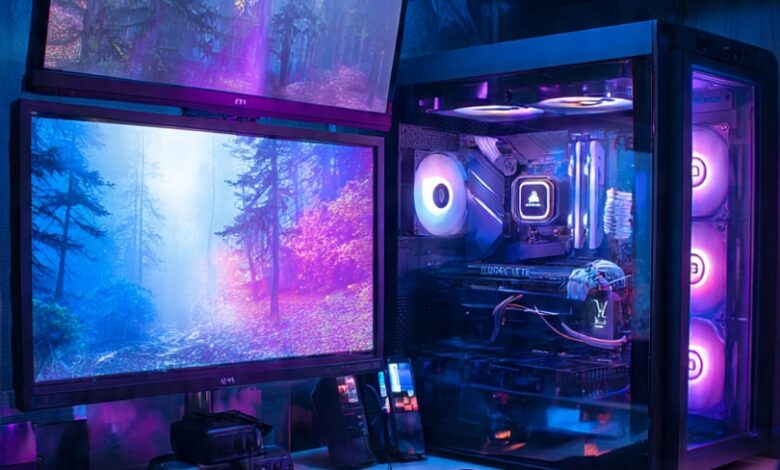
Choosing the right pc for gaming in the UK in 2026 can feel overwhelming. With new processors, graphics cards, faster storage technologies, and advanced gaming features constantly entering the market, there are more options available than ever before. Whether you are a casual gamer, a competitive esports player, or someone who enjoys visually demanding AAA titles, selecting the right gaming PC requires careful consideration.
Gamers in London, Manchester, and across the UK have access to a wide range of gaming PCs designed for different budgets and gaming requirements. However, the most expensive system is not always the best choice for every player. The ideal gaming PC should offer the right balance between performance, price, upgradeability, cooling, and features.
Before investing in a new system, it is important to understand which specifications will have the biggest impact on your gaming experience. From choosing the right graphics card to ensuring your PC has enough storage, here are 10 essential features to look for when buying a pc for gaming in the UK in 2026.
1. Choose the Right Graphics Card for Your Games
The graphics processing unit, commonly known as the GPU, is one of the most important components in a gaming PC. It handles the rendering of game environments, textures, lighting, shadows, visual effects, and other graphical elements.
When choosing a pc for gaming, your graphics card should match the type of games you want to play and the resolution you plan to use.
For example, gamers who primarily enjoy competitive esports titles may prioritise high frame rates at 1080p, while those playing modern AAA games may prefer 1440p or 4K resolution with enhanced graphical settings.
When comparing GPUs, consider factors such as:
- Gaming resolution
- Expected frame rates
- VRAM capacity
- Ray tracing capabilities
- AI-powered upscaling features
- Game requirements
- Future performance needs
A balanced graphics card can provide an excellent gaming experience without forcing you to spend more than necessary. Instead of automatically choosing the most expensive GPU, consider your gaming habits and select a model that provides the performance you actually need.
2. Look for a Modern and Capable Processor
The CPU is another critical component of a gaming PC. It manages game logic, physics, artificial intelligence, background tasks, and many other processes that contribute to overall performance.
A modern processor can help ensure that your graphics card performs effectively without unnecessary bottlenecks. The right CPU will depend on your budget and the type of games you play.
If you mainly play competitive games, a processor with strong gaming performance can be beneficial. However, if you also stream gameplay, edit videos, record content, or run multiple applications simultaneously, you may benefit from a processor with additional cores and threads.
When buying a pc for gaming in the UK in 2026, consider the processor alongside the GPU rather than evaluating it independently. A well-balanced CPU and GPU combination can often provide better value than spending too much on one component while neglecting the other.
3. Make Sure You Have Enough RAM
RAM, or random access memory, helps your PC manage games and applications efficiently. Having sufficient memory can improve multitasking and help your system handle modern gaming workloads more comfortably.
The amount of RAM you need depends on your gaming habits. If you only play games and use a few basic applications, you may have different requirements from someone who streams, records gameplay, or runs multiple programs simultaneously.
When purchasing a gaming PC, look beyond the total RAM capacity. Check whether the motherboard has additional memory slots and whether the system can be upgraded in the future.
Choosing a PC with upgrade potential can be particularly useful if you want to keep your system for several years. As games and applications become more demanding, having the ability to expand your memory can extend the useful lifespan of your PC.
4. Prioritise Fast SSD Storage
Storage is another feature that should not be overlooked when buying a gaming PC in 2026. Modern games can require significant amounts of space, while faster storage can improve boot times and loading experiences.
An SSD is generally the preferred storage solution for modern gaming PCs because it offers faster access to data compared with traditional hard drives.
A fast SSD can provide benefits such as:
- Faster Windows startup
- Quicker game loading
- Faster application launches
- More responsive system performance
- Reduced waiting times when accessing files
Capacity is equally important. If you regularly install large AAA games, having limited storage can quickly become frustrating.
Look for a pc for gaming with enough storage for your current game library and consider whether additional M.2 or storage expansion options are available.
5. Check the Cooling and Airflow
Gaming PCs can generate considerable heat, especially during long gaming sessions. Effective cooling is essential for maintaining stable performance and helping your components operate within appropriate temperature ranges.
Before purchasing a gaming PC, check how the system handles heat. Depending on the configuration, cooling may include air coolers, tower-style CPU coolers, liquid cooling systems, intake fans, and exhaust fans.
Good airflow allows cool air to enter the case while helping warm air leave efficiently.
Cooling is especially important if you plan to play demanding games for several hours at a time. A well-cooled system can also help maintain consistent performance during extended gaming sessions.
Noise is another factor worth considering. A gaming PC that becomes excessively loud under load may affect your overall experience, particularly if your gaming setup is located in a bedroom or shared space.
6. Choose a Reliable Power Supply
The power supply unit, or PSU, provides electricity to every major component in your gaming PC. It is therefore an essential part of the system, even though it may not receive as much attention as the CPU or GPU.
A suitable PSU should provide enough wattage for your current components and have the necessary connectors for your graphics card and other hardware.
When choosing a pc for gaming, consider:
- PSU wattage
- Efficiency rating
- Quality and reliability
- Available connectors
- Compatibility with your GPU
- Future upgrade requirements
A reliable power supply can provide greater confidence in your gaming PC and support future upgrades.
If you plan to install a more powerful graphics card later, it may be worth choosing a system with sufficient power capacity to accommodate potential upgrades.
7. Consider Motherboard Features and Upgradeability
The motherboard connects your processor, memory, storage, graphics card, and other components. It also determines many of the expansion and connectivity options available to you.
A motherboard with useful upgrade options can make your gaming PC more flexible in the future.
Look for features such as:
- Multiple RAM slots
- M.2 SSD support
- PCIe expansion slots
- Multiple USB ports
- Modern networking
- Wi-Fi connectivity
- Bluetooth support
Upgradeability can be particularly valuable if your gaming requirements change over time. You may eventually want to add more storage, increase RAM, or upgrade your graphics card.
Rather than choosing a system that only meets your immediate requirements, consider whether it provides enough flexibility to grow with your needs.
8. Match Your PC with the Right Gaming Monitor
Your gaming PC and monitor should be considered together. A powerful gaming PC paired with an unsuitable display may prevent you from getting the most from your hardware.
Think about whether you want to play at 1080p, 1440p, or 4K. You should also consider refresh rate and response time, particularly if you enjoy competitive games.
For competitive gamers, a high-refresh-rate display can provide a smoother experience. Meanwhile, players who enjoy immersive single-player games may prioritise higher resolution and image quality.
Before buying your pc for gaming, decide what type of gaming experience you want. This will help you select hardware that matches your monitor and avoids unnecessary spending.
9. Look for Modern Connectivity
Modern gaming setups often include more than just a keyboard and mouse. You may also use a gaming headset, controller, webcam, external storage, microphone, and other accessories.
For this reason, connectivity is an important consideration.
Look for a gaming PC that offers enough USB ports and supports the connections you need. Built-in Wi-Fi can be useful if connecting through Ethernet is inconvenient, while Bluetooth can make it easier to connect compatible wireless accessories.
For online gaming, a reliable internet connection is also essential. If possible, a wired Ethernet connection can provide a stable connection for multiplayer gaming.
Choosing a PC with modern connectivity options can help keep your gaming setup organised and flexible.
10. Choose a Design That Matches Your Setup
While performance should always be a priority, aesthetics can also play an important role in choosing your gaming PC.
Your computer is often the centrepiece of your gaming setup, so selecting a design that matches your personal style can make your gaming space more enjoyable.
A White Gaming PC is an increasingly popular option for gamers who prefer a clean, modern, and minimalist appearance. A white case can work particularly well with RGB lighting, white gaming desks, and matching peripherals.
However, aesthetics should never be considered separately from performance. When choosing a White Gaming Pc, make sure you also evaluate the processor, graphics card, RAM, storage, cooling, power supply, and upgrade potential.
The ideal system should look great while delivering the performance you need.
Consider Your Gaming Budget in the UK
The best pc for gaming is not necessarily the most expensive model. Your ideal choice depends on your personal gaming requirements and budget.
For example, a casual gamer in London may want an affordable system for popular esports games, while a content creator in Manchester may require additional processing power for streaming and video editing.
Before making a purchase, consider:
- Which games you play
- Your target resolution
- Your preferred frame rate
- Whether you stream or create content
- How much storage you require
- Your future upgrade plans
- Your total budget
By understanding your priorities, you can focus your budget on the components that will have the biggest impact on your experience.
Think About Future-Proofing
Gaming technology continues to develop quickly, so future-proofing should also be part of your purchasing decision.
While no PC can guarantee that it will run every future game at maximum settings, choosing modern components and allowing room for upgrades can help extend the useful life of your system.
Look for a gaming PC with modern connectivity, sufficient storage, upgradeable RAM, effective cooling, and a suitable power supply.
A well-balanced system that can be upgraded over time may provide better long-term value than a PC that offers impressive specifications today but has limited expansion options.
Find the Right PC for Gaming in the UK
Choosing the right pc for gaming in 2026 is about finding the right balance between performance, features, budget, and future upgrade potential. Whether you are upgrading your existing setup or buying your first gaming PC, understanding the importance of the GPU, CPU, RAM, storage, cooling, PSU, motherboard, connectivity, and monitor compatibility can help you make a smarter decision.
For gamers across the UK, from London and Manchester to cities and towns nationwide, the right gaming PC can transform the way you experience your favourite titles. If aesthetics are also important to you, a White Gaming Pc can add a clean and stylish finish to your gaming environment without compromising on performance when you choose the right specifications.
Ready to upgrade your gaming setup? Explore the latest gaming PCs available in the UK, compare specifications, and find a system that delivers the performance, style, and flexibility you need for gaming in 2026. Choose your ideal gaming PC today and take your gaming experience to the next level.